Kadraj for Mac

Every click, framed.

The screen recorder that edits like a camera operator. It zooms into every click, smooths the cursor and cleans your voice — then an AI editor on your Mac does the rest.

Free during the beta · macOS 15 or later · Apple silicon

One window.
The whole studio.

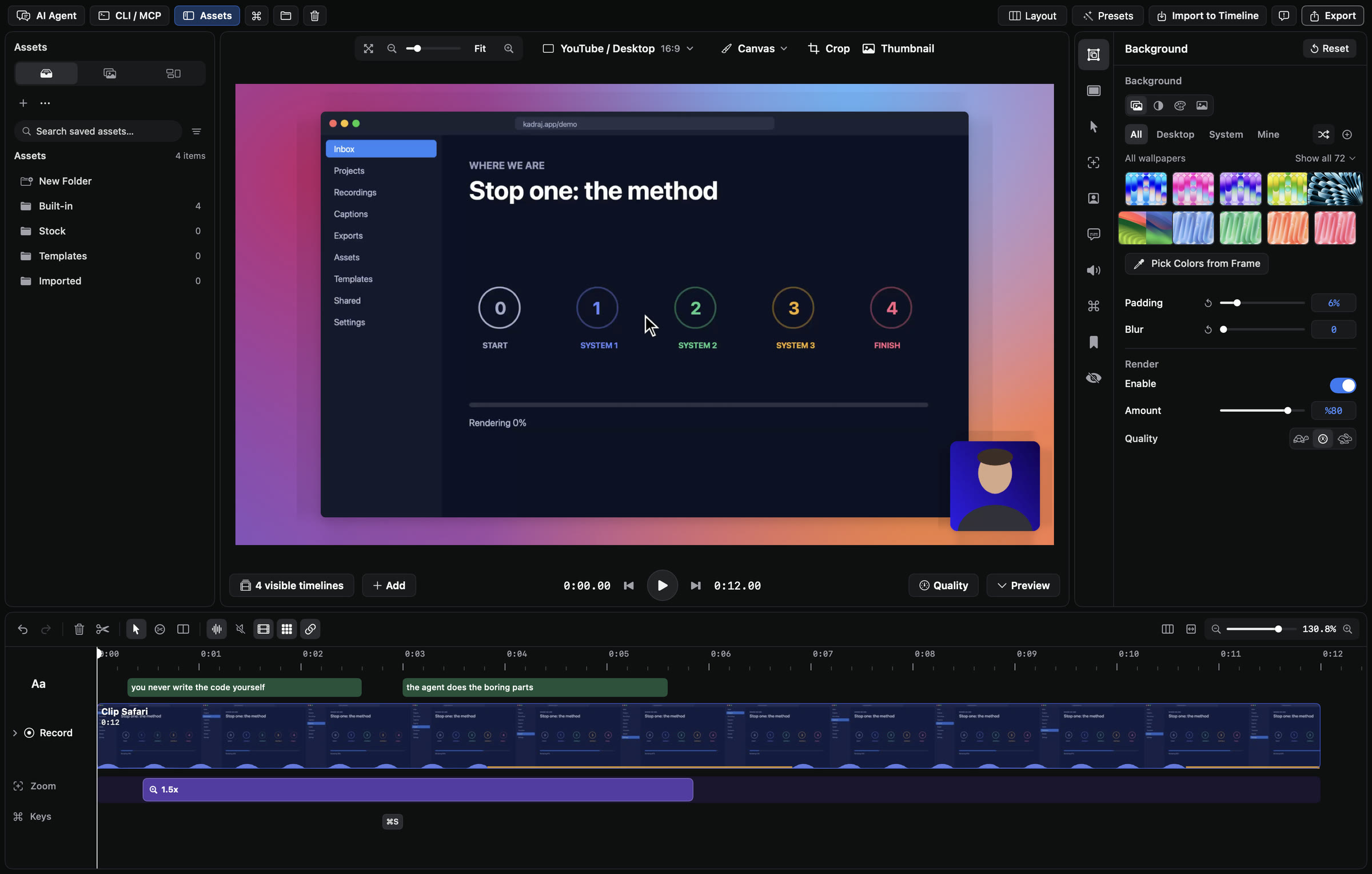
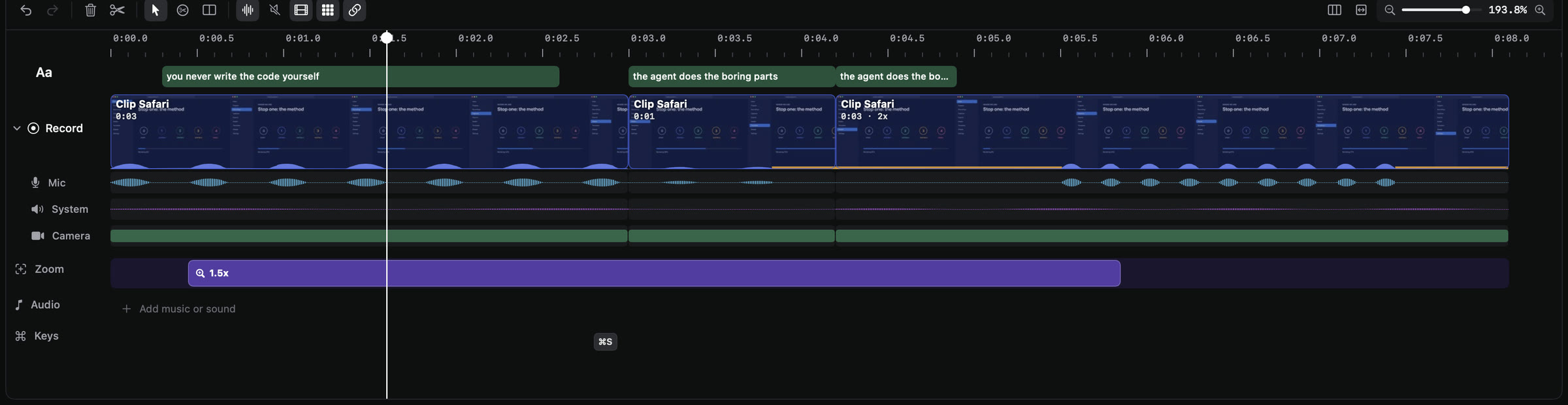
Record your screen, camera and voice, then shape the take with a timeline that keeps every layer apart — background, screen, cursor, camera and captions.

The Kadraj editor: assets on the left, the preview with a gradient background in the middle, the background inspector on the right and the timeline below
The timeline: captions, the recording split into clips, mic, system audio and camera lanes, and a 1.5× zoom

Auto zoom

Zooms that follow you.
Never dizzy.

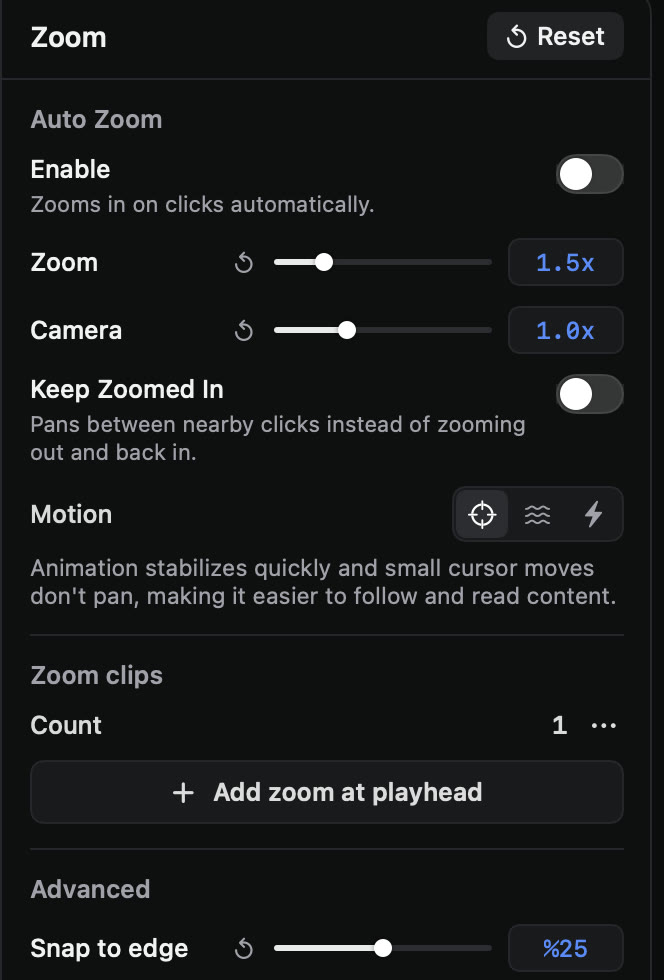
Kadraj zooms in where you click and type, follows the cursor and pulls back out on its own — no keyframes. Pick how the camera moves: Stable holds still while the cursor wiggles, Fluid floats, Bouncy overshoots.

00:00:00:00 Zoom 1.00×
Zoom inspector: auto zoom, zoom and camera amount, keep zoomed in, motion styles, snap to edge

Sound

Studio voice.
Music it writes itself.

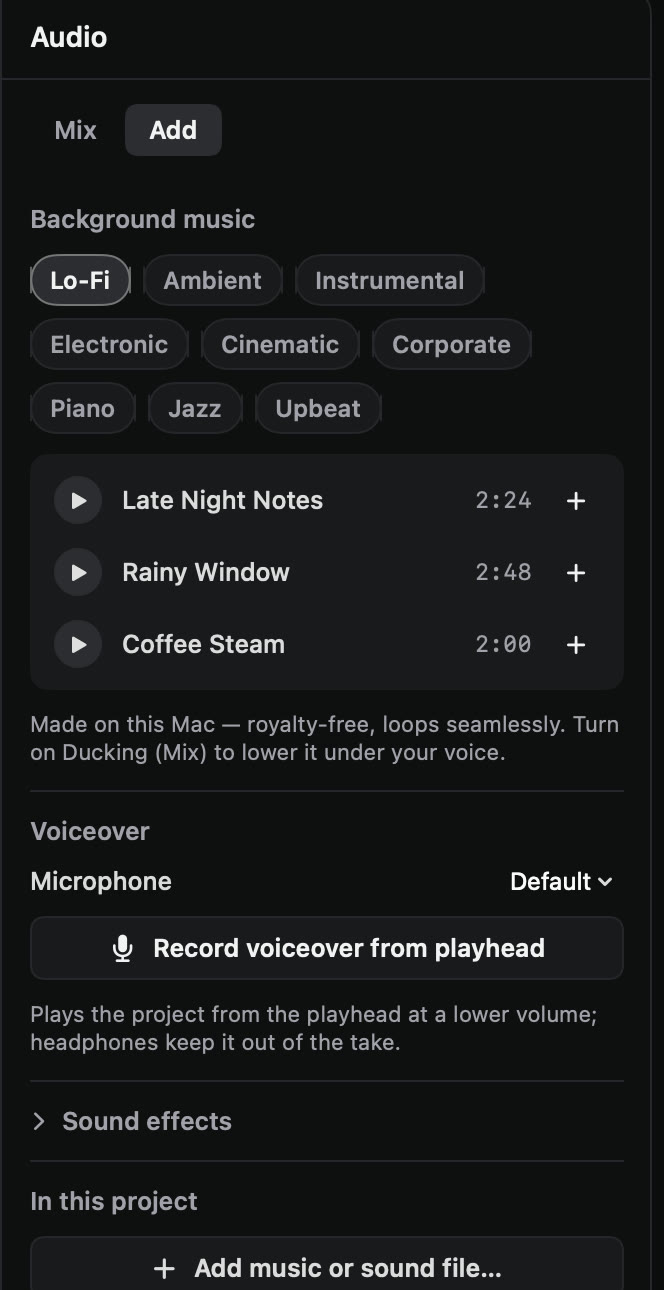
Noise removal and ducking for your voice, and a soundtrack composed on your Mac in under a second — nine genres, seamless loops, royalty-free. Sound effects and voiceover from the playhead, too.

Audio panel: background music genres, generated tracks, voiceover and sound effects
VoiceNoise removed · −16 LUFS
Music · Late Night NotesLo-Fi · 2:24 · ducked under voice
Lo-FiAmbientInstrumentalElectronicCinematic CorporatePianoJazzUpbeat

Captions

Every word,
right on time.

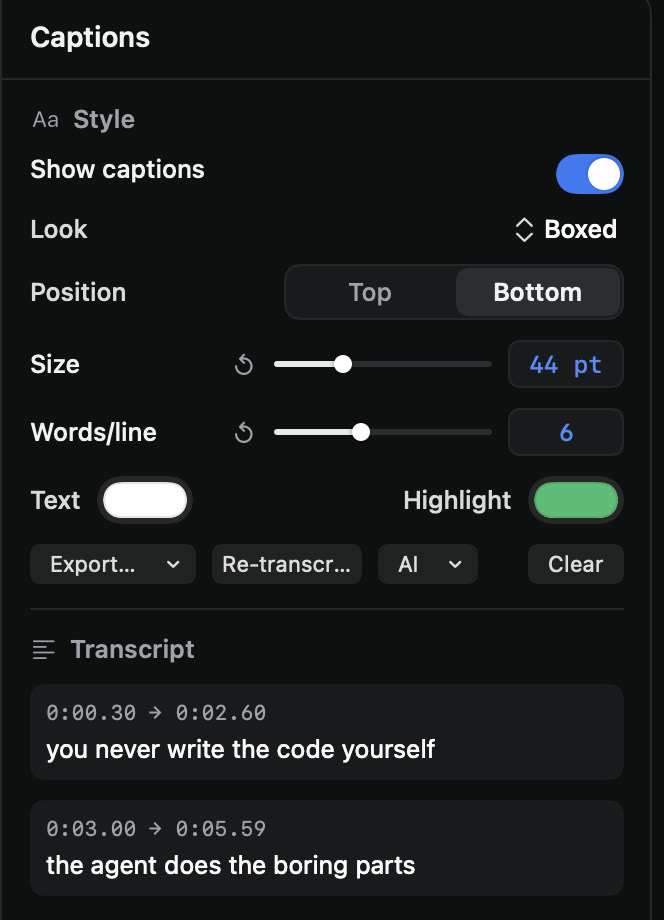
Kadraj transcribes your voice with word timing — on your Mac for languages that support it — and highlights each word as you say it. Edit the text, pick a look, export SRT or VTT.

0:00.30 → 0:02.60Boxed · Bottom · 44 pt
Captions panel: style, position, size, words per line, highlight colour and transcript

Secret Shield

Never leak a key
in a demo again.

One click finds API keys, tokens, .env secrets, emails and card numbers on screen and blurs them — and the blur follows the text through scrolls, cuts and zooms. It runs on your Mac and reads the final render back to prove it.

.env — my-appScanning…
OPENAI_API_KEY=sk-proj-4f9a2c71e0b84d6fa3c19e7b52d0
STRIPE_SECRET_KEY=sk_live_51Hx9QeLk2Tz7yVb3mN0pR8w
DATABASE_URL=postgres://admin:Gr8pass@db.internal:5432/app
SUPPORT_EMAIL=ada@example.com
PORT=3000
LOG_LEVEL=debug

On-device AI

Just say
what you want.

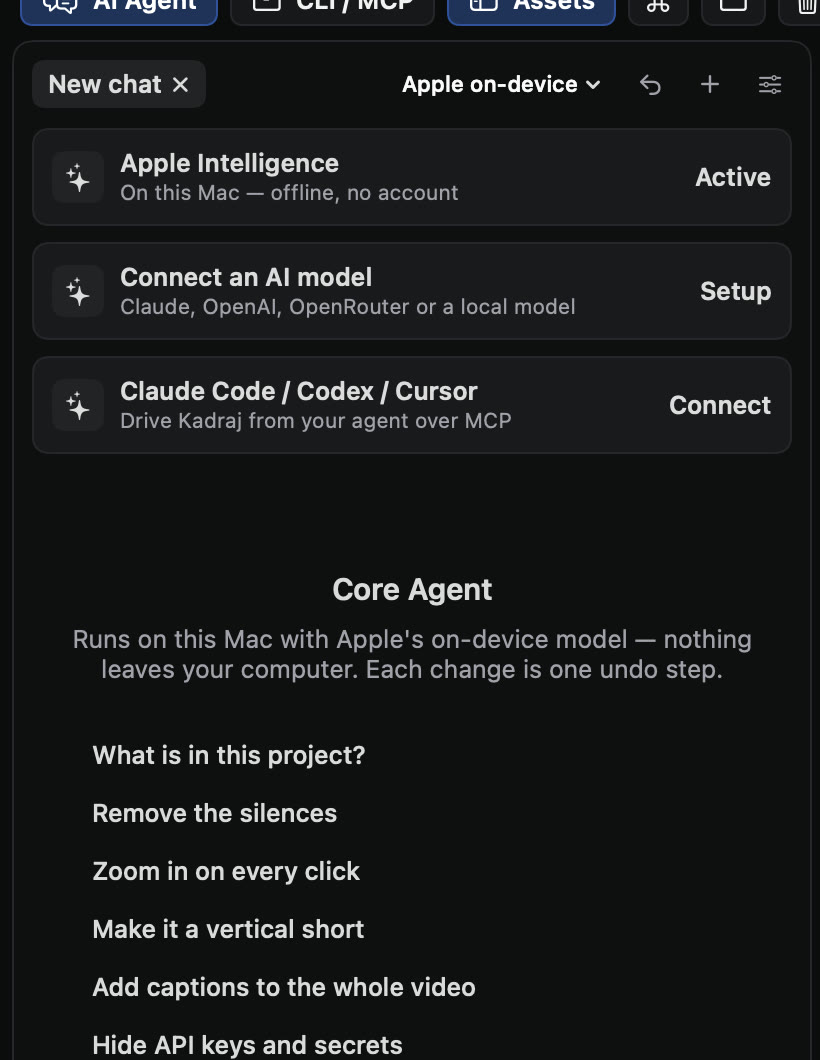
The editing agent runs on Apple Intelligence, right on your Mac — no account, no API key, nothing uploaded. Every change is one undo step. Prefer your own model? Connect Claude, OpenAI, OpenRouter, Ollama or LM Studio, or let Claude Code, Codex and Cursor edit through 66 tools over MCP.

AI agent panel: Apple Intelligence active, connect a model, Claude Code / Codex / Cursor, and suggested requests
Ask, or describe an edit…Apple on-device

Inside a frame

Five layers.
One take.

You record once. Kadraj keeps every part of the picture separate — so each one stays editable until you export.

  1. 01
    BackgroundmacOS wallpapers, mesh gradients, a colour — or transparent
  2. 02
    ScreenHEVC or ProRes, up to 120 fps on a constant frame grid
  3. 03
    Cursorre-drawn from the recording: smoothed, sized, with click effects
  4. 04
    Camerashape, border, background removal, face centering
  5. 05
    Captionstranscribed with word timing, four styles

kadraj /kad·raʒ/ — Turkish, from the French cadrage: the frame a camera sees.

Background
Screen
Cursor
Camera
you never write the code yourself
Captions

Record to export

Start in a click.
Finish anywhere.

The recording toolbar: display, window, area, screenshot or device; camera, system audio and microphone

Screen, camera and voice — in sync.

Display, window, area, iPhone or Simulator. Your camera appears the moment the toolbar opens, and Kadraj never shows up in its own recording. Pause and resume keep audio within ~1 ms and video within a frame.

120fps capture on a constant frame grid
~1 msaudio sync, before and after pause
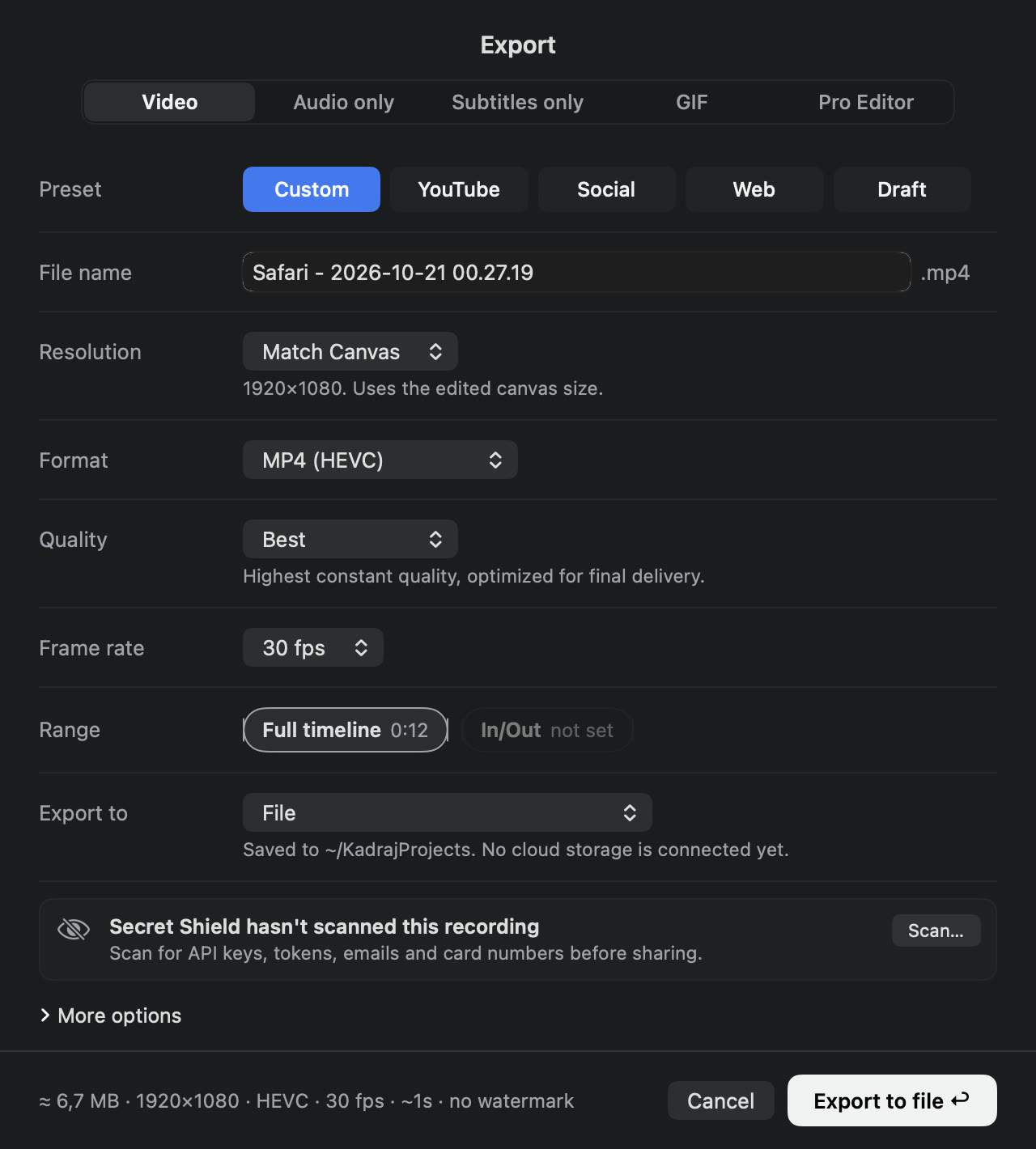
Export sheet: video, audio only, subtitles, GIF and pro editor; presets, format, quality and frame rate

ProRes 4444 with alpha

Transparent backgrounds stay transparent. Or MP4 H.264 / HEVC up to 4K 60, GIF, audio and subtitles.

Final Cut · Resolve · Premiere

Screen, cursor and camera on separate layers, every zoom as keyframes. Or share with AirDrop, Mail and Messages.

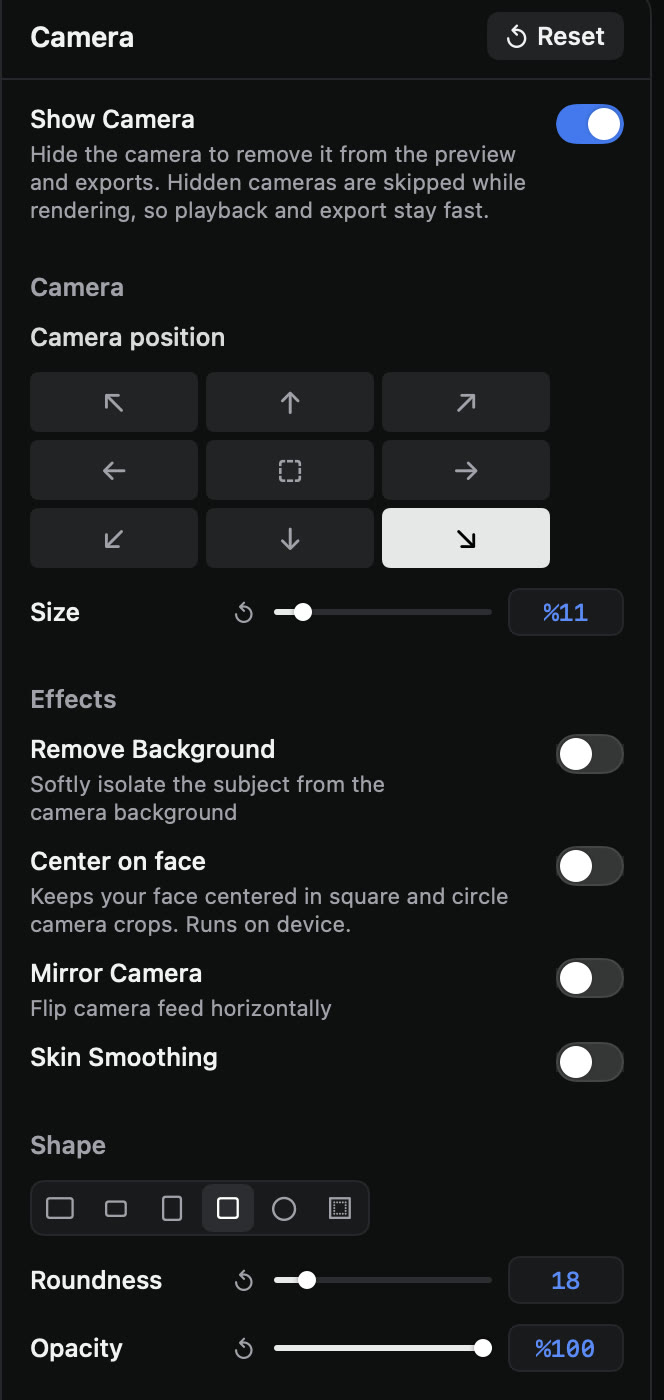
Camera inspector: position, size, background removal, center on face, shape

Privacy

Nothing leaves
the frame.

Kadraj has no account and sends nothing home. It uses the internet only when you ask it to — uploading to your own storage, or calling an AI model you connected with your own key.

No accountNo telemetryOn-device AIProjects are plain folders

Read the privacy policy ›

Pricing

One price.
Yours to keep.

Beta
Free

While we polish it with you.

  • Every feature
  • No watermark
  • A direct line to the developer
Request access
Kadraj Pro · founder price at launch
$69 $99

One-time. No subscription.

  • 3 Macs
  • 12 months of updates
  • Keeps working forever
Join the launch list

Questions.

Which Macs does Kadraj run on?

Macs with Apple silicon running macOS 15 Sequoia or later. The on-device AI editor needs macOS 26 with Apple Intelligence turned on; everything else works without it.

Does it need the internet?

No. Recording, editing, Secret Shield, music and the on-device agent work offline. Captions use Apple's speech recognition — on your Mac for languages that support it. Only uploads to your own storage and AI models you connect use the network.

Can I keep editing in Final Cut Pro, DaVinci Resolve or Premiere?

Yes. Kadraj writes FCPXML, OpenTimelineIO and Premiere XML timelines with the screen, cursor and camera on separate layers and every zoom as keyframes.

Can Claude Code or Cursor edit my videos?

Yes — Kadraj includes an MCP server with 66 editing tools. With the app open, an agent's edits appear live and can be undone.

Is the music really free to use?

Yes. Each track is composed on your Mac from a seed — there's no library to license.

What does “Kadraj” mean?

It's Turkish for the frame a camera sees, from the French cadrage. Say it “kad-rahzh” — it rhymes with garage.

How do I get help?

Write to contact@emincan.com, or use Kadraj → Send Feedback… in the app.
Your next recording,
already edited.

Free while it's in beta. One price when it ships — yours to keep.